Set up Article Groups
Please note
Our advice is to divide the article groups into Brand and Product Group or Brand and Material.
For example: (1) Kasius Earrings (2) Kasius Rings (3) Seiko Watches (4) Breitling Watches
For statistics, also read more about the classification into turnover groups.
What are article groups used for?
Article groups are used to group products for statistics and possibly for the webshop. Every product is always in an article group. The product can be added to an article group via the purchase order and on the product edit page.
Finding article groups and explanation of the overview page
In the menu on the left, click on 'Article groups' (under Inventory) to display the overview.
Explanation of the overview:

1: Edit article group
2: Merge article group
3: Delete article groups

Till ledger: The ledger account number of the sale for the accountant.
Purchase ledger: The ledger account number of the purchase for the accountant.
Changing article groups and explanation of the page
- 1
In the menu, click on 'Article groups' (under Inventory)
- 2
Click on the pen icon for the article group to change it.
Creating article groups
- 1
In the menu, click on 'Article groups' (under Inventory)
- 2
Click on the 'Options' button at the top right.
- 3
Choose the 'New article group' option.
- 4
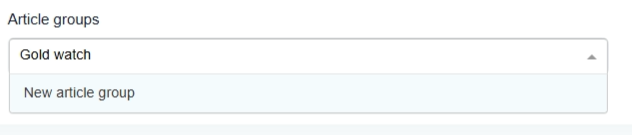
Type the desired name in the search bar and click on the 'New article group' bar.
- 5
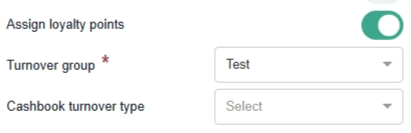
Select the correct turnover group on the left
- 6
Set other preferences if desired.
- On the right, select the suppliers for this article group and enter their margin for this article group.
- Show in assortment: Set this switch to 'Active' if you also want to show the article group under the 'Article groups' filter in 'Assortment'.
- Optional: select the desired properties on the right (this is only relevant if it is not filled in per product and all products in the article group have the same properties). Otherwise, this can be left as standard.
- 7
Click on the Add button
Was this article helpful?
Another question?
Ask Linde — answers come with sources.