Managing cash flow between till, safe and bank
You can manage the cash flow between the till, safe and bank via the 'Expenses' button in the till.
Read the steps in detail below.
Setting up a safe
In our guide create safe you will discover how to create a safe. Here you can also check if you have a safe.
Do you have multiple branches? It is important to create a separate safe for each location and link them. Follow the steps in the guide via the link above.
Moving cash between till, bank or safe
You can manage the cash flow between the till, safe and bank via the 'Expenses' button in the till.
- 1
In the menu, click on 'Till'
- 2
Click on the 'Expenses' button
- 3
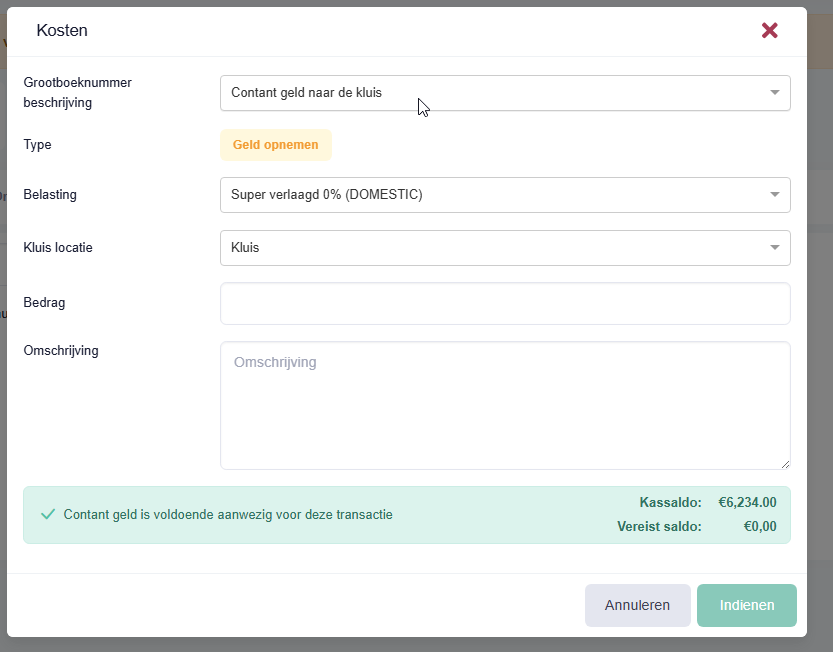
Select the desired General Ledger account description:
-
Cash to safe
-
Cash from safe
-
Cash from bank
-
Cash to bank
(This depends on how you want to register the cash flow from the till).
Do you want to move cash from the safe to the bank? The best way to do this is to first enter the amount with 'Cash from safe' and then repeat the steps and select 'Cash to bank'.
-
- 4
Enter the amount and description.
- 5
Click on the 'Submit' button
- 6
If desired, you can print a receipt with one of these buttons.

Viewing cash balance in safe
- 1
In the menu, click on 'Till'
- 2
Click on the 'Expenses' button
- 3
Select General Ledger account description: Cash from safe
You will now see the safe balance at the bottom right of the screen.
Moving cash from till to safe during till closing
Even during closing the till you can indicate how much money you are taking to the safe. This amount will then be moved. Click on the link to find out more about this.
Was this article helpful?
Another question?
Ask Linde — answers come with sources.